![Logo - NETRONIC Software - Gantt Charts for Visual Scheduling-a-Boyum-IT-Company-01.png]](https://help.netronic.com/hs-fs/hubfs/2017%20Relaunch/Logo/Logo%20-%20NETRONIC%20Software%20-%20Gantt%20Charts%20for%20Visual%20Scheduling-a-Boyum-IT-Company-01.png?height=50&name=Logo%20-%20NETRONIC%20Software%20-%20Gantt%20Charts%20for%20Visual%20Scheduling-a-Boyum-IT-Company-01.png)
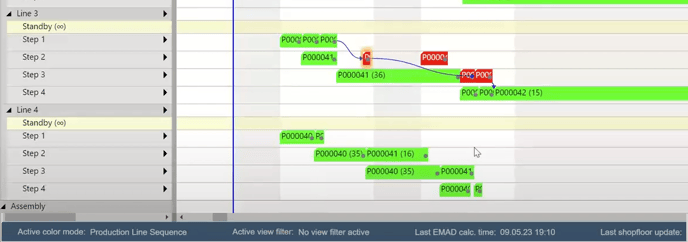
If you work with production lines, the Production Line Sequence View will visually indicate if there is a violation of the “physical dependency” restriction, such as one production order overtaking the other.
You can apply the Production line sequence view in two ways:
- When creating a new simulation, you can choose it as the "default view color type":

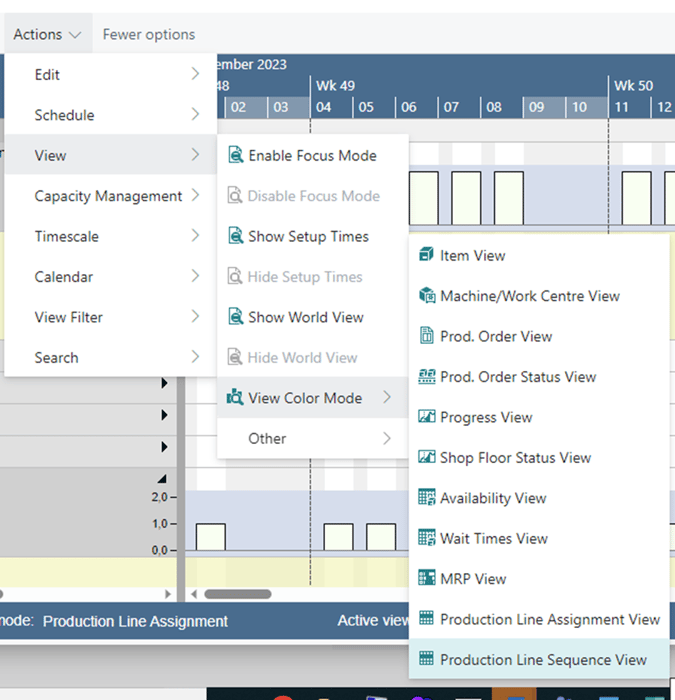
- In the visual schedule, you can select Actions --> View -->View Color Mode --> Production Line Sequence View: