![Logo - NETRONIC Software - Gantt Charts for Visual Scheduling-a-Boyum-IT-Company-01.png]](https://help.netronic.com/hs-fs/hubfs/2017%20Relaunch/Logo/Logo%20-%20NETRONIC%20Software%20-%20Gantt%20Charts%20for%20Visual%20Scheduling-a-Boyum-IT-Company-01.png?height=50&name=Logo%20-%20NETRONIC%20Software%20-%20Gantt%20Charts%20for%20Visual%20Scheduling-a-Boyum-IT-Company-01.png)
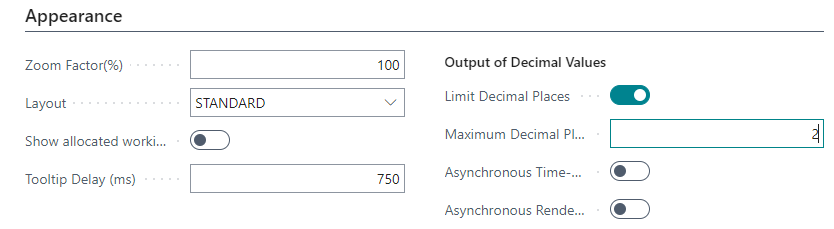
Here you can
-
set the zoom factor in %
-
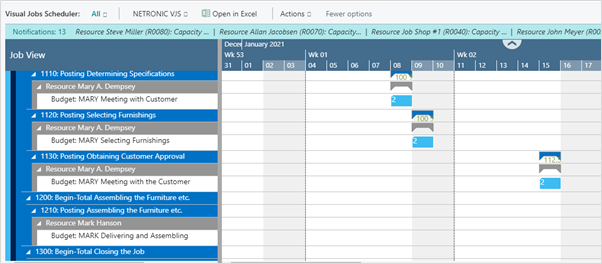
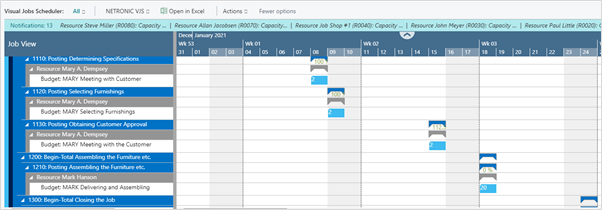
choose the layout: In the "Compact" layout, the display is reduced as much as possible to provide a better overview, especially with large plans.
-
Standard layout:
-
-
-
Compact layout
-
-
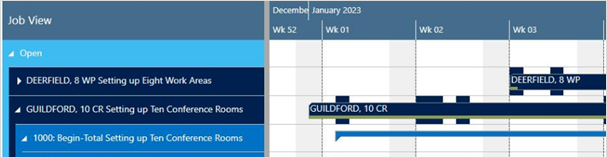
Decide whether to show allocations on a job in the job line: This option allows to highlight all dates on the job line in the Gantt view on which job planning lines are planned and occupy resources:
-
Specify a tooltip delay: give a time in milliseconds after which the tooltip shall appear.
-
Specify the number of decimal places displayed in tooltips, bars, and tables.
-
Improve the visual responsiveness and performance when navigating big plans by ticking off/on the options:
-
Asynchronous Time-Area Stretching
-
Asynchronous Rendering
-