![Logo - NETRONIC Software - Gantt Charts for Visual Scheduling-a-Boyum-IT-Company-01.png]](https://help.netronic.com/hs-fs/hubfs/2017%20Relaunch/Logo/Logo%20-%20NETRONIC%20Software%20-%20Gantt%20Charts%20for%20Visual%20Scheduling-a-Boyum-IT-Company-01.png?height=50&name=Logo%20-%20NETRONIC%20Software%20-%20Gantt%20Charts%20for%20Visual%20Scheduling-a-Boyum-IT-Company-01.png)
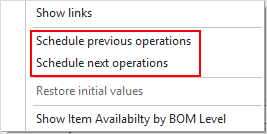
Affect predecessor/successor on command
Open the context menu and click the according item so that if moving an operation this will also affect its linked preceding and/or succeeding operations to the effect that they are moved accordingly
Carry out the scheduling automatically
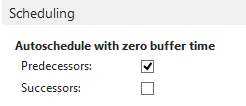
If the options “Autoschedule with zero buffer time” “Predecessors” and or “Successor” (Scheduling area) have been ticked in the "Setup" dialog, the corresponding action selected in the context menu will be carried out automatically when an operation is moved.