![Logo - NETRONIC Software - Gantt Charts for Visual Scheduling-a-Boyum-IT-Company-01.png]](https://help.netronic.com/hs-fs/hubfs/2017%20Relaunch/Logo/Logo%20-%20NETRONIC%20Software%20-%20Gantt%20Charts%20for%20Visual%20Scheduling-a-Boyum-IT-Company-01.png?height=50&name=Logo%20-%20NETRONIC%20Software%20-%20Gantt%20Charts%20for%20Visual%20Scheduling-a-Boyum-IT-Company-01.png)
The progress bar of an operation can be shown or hidden by clicking the “Diagram” buttons.
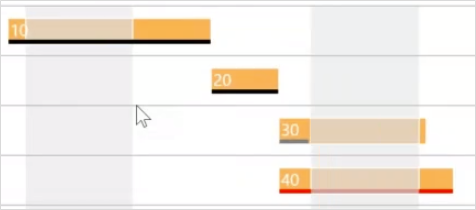
The coloring of the progess bar depends on the operation’s status:
- an operation in progress is shown in grey
- a finished operation gets a black bar
- bars with a calculated progress > 100 % appear in red