![Logo - NETRONIC Software - Gantt Charts for Visual Scheduling-a-Boyum-IT-Company-01.png]](https://help.netronic.com/hs-fs/hubfs/2017%20Relaunch/Logo/Logo%20-%20NETRONIC%20Software%20-%20Gantt%20Charts%20for%20Visual%20Scheduling-a-Boyum-IT-Company-01.png?height=50&name=Logo%20-%20NETRONIC%20Software%20-%20Gantt%20Charts%20for%20Visual%20Scheduling-a-Boyum-IT-Company-01.png)
The VAPS lets you
- add/remove work time for multiple machine/work centers in one interaction
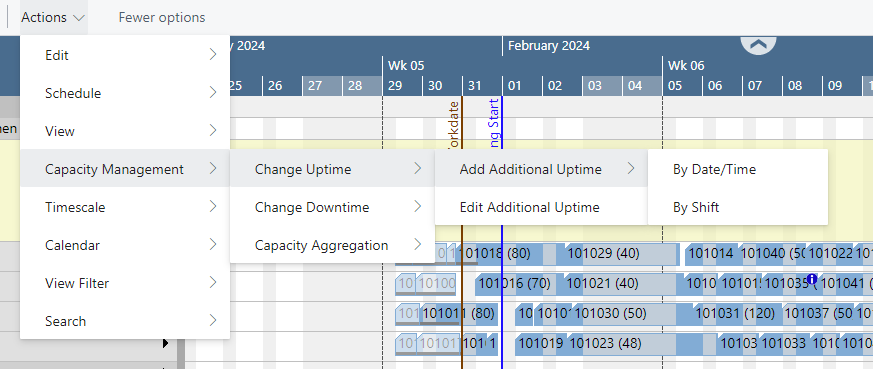
- add/remove work time for entire shifts by work shift codes for one or multiple machine/work centers
Both options can be found under the "Actions" menu entry "Capacity Management"
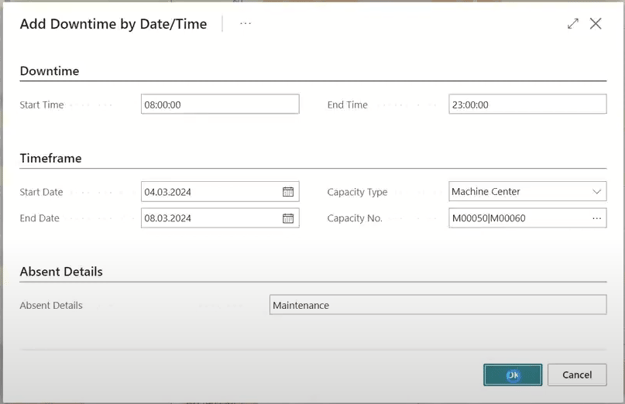
In the picture below, downtimes have been added by date/time for two machine centers:
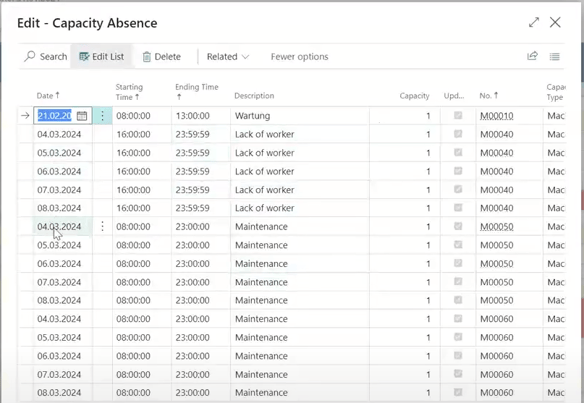
This is what the result looks like:

In the "Edit" dialog, you can change all your up/downtimes: